 Install extension
Tiers
Every tier in one run
Schedule each chapter to all your tiers at once, as one post every selected tier can see.
Save your chapters, set a weekly schedule and send every chapter to every tier from your Patreon post editor. Built for creators who post serial chapters to several tiers.

 Chrome extensionPatreon
No login needed. The extension works right on your Patreon post editor in your own browser, just as you would by hand. You never give us your Patreon login or password.
How it works
Paste from Word or Google Docs, or upload your files. Each heading becomes the post title.
Paste or uploadChoose the first date and how many chapters go live on each weekday.
A count per weekdayTick the tiers once. Each chapter becomes one post every selected tier can see.
Every tierPress Patreon’s own Schedule button and the rest follows.
One runYour week
Choose how many chapters go live on each weekday. Use zero on days you do not post.
A sample schedule
7 chapters this week
22 chapters in launch week18 of them in the first 3 days, then the weekly schedule takes overBurst dayWeekly schedule
Private by design
Everything happens locally in your browser. There is nothing to hand over: no password, no uploads to our servers, no diagnostics.
The extension works right on the Patreon page you already use, just as you would by hand. There is nothing to connect and no Patreon password to give us.
Your chapters and project settings are saved in Chrome on this computer, and go straight from your browser to Patreon.
Our servers never receive your chapter text, notes or logins. No diagnostics, crash reports or analytics are collected.
Polar handles checkout and invoices. We never see your card details.
Video guides
Short walkthroughs of saving chapters, choosing tiers and checking results.
The extension
Keep your chapters in one place, choose when they go live and who sees them, and check every post afterwards.

Step 1 of 4
Paste from Word or Google Docs, or upload .docx, .txt, .md and .html files. Each heading becomes the post title, and bold and italics are kept.

Step 2 of 4
Choose the first date, the chapter to start with and how many chapters go live on each weekday.

Step 3 of 4
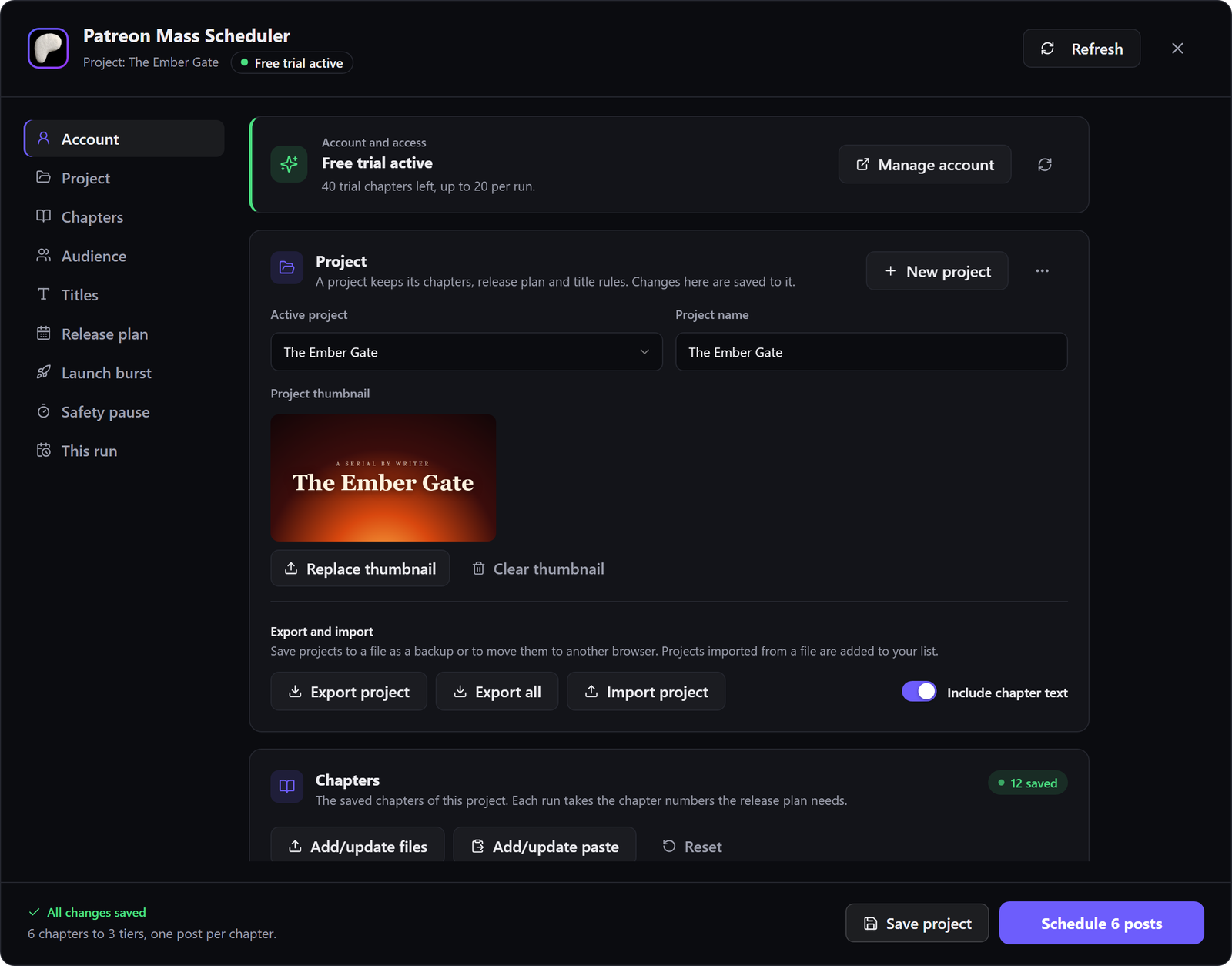
Open the scheduler in your Patreon post editor: one screen with your account, project, tiers, titles and plan. Tick the tiers and choose the collection.

Step 4 of 4
Press Patreon’s own Schedule button and the rest follows. Every post is listed with its release time and a link to it.
Made for a real posting routine
Keep settings with each project and move between stories without rebuilding your schedule.
Tiers
Schedule each chapter to all your tiers at once, as one post every selected tier can see.
Cadence
Set the chapter count for each weekday. Use zero on days you do not post.
Launch
Release more chapters on the first days of a story or a new arc, each day with its own count and time, then the weekly schedule takes over.
Safe
A post that is already scheduled on Patreon with the same title and time is left alone, so running the same chapters again is safe.
Polish
Add the collection or tier names to titles, file every post in one collection, and give every post the project thumbnail.
Portability
Export every project with its chapters to one file, and restore it on another computer.
Tiers
Tick the tiers once. Each chapter is scheduled as one post every selected tier can see, filed in your collection and named the way you want.
Use a fresh draft for each run. The scheduler never changes posts that are already scheduled or published.
Tiers and titlesThe Ember Gate Chapter 41: The Last Letter
Supporter · Patron · Inner Circle
Plans
The free trial needs no card and lets you schedule up to 20 chapters per run, 60 chapters in total (for example 3 runs of 20). Paid plans schedule up to 500 chapters per run, with unlimited runs.
$10 / month Original price: $30
Save $20 every month
No free trial: full access starts as soon as the first payment goes through.
 Webnovel Mass SchedulerUp to 500 chapters per run, unlimited runsPatreon Mass SchedulerUp to 500 chapters per run, unlimited runs
 Royal Road Mass SchedulerUp to 500 chapters per run, unlimited runs
14-day money-back guarantee
$5 / month Original price: $10
Save $5 every month
Free trial · no card needed
Trial: 20 chapters per run, 60 in total
Patreon Mass SchedulerUp to 500 chapters per run, unlimited runs14-day money-back guarantee
Prices, billing interval and taxes are confirmed by Polar at checkout. You can cancel anytime from Manage billing; access continues until the end of the period you paid for.
User guide
Installation, sign-in, saving chapters, tiers, scheduling and troubleshooting, step by step.
Questions
What creators usually ask before their first run.
The Support page covers setup and common problems, or write to us directly.
No. Everything runs inside Chrome on your computer. The extension schedules in the Patreon tab you are already signed in to, so you never give us your Patreon password, and your chapters go straight from your browser to Patreon. The extension collects no diagnostics, crash reports or analytics.
The free trial needs no card and lets you schedule up to 20 chapters per run, 60 chapters in total (for example 3 runs of 20). Paid plans schedule up to 500 chapters per run, with unlimited runs. A chapter counts once, however many tiers it goes to. Posts you schedule stay scheduled on Patreon after the trial.
No. The free trial needs no card: start it on the website with your email address. A card is asked for only when you subscribe to keep scheduling.
Yes. Cancel from Manage billing on your account page. You keep access until the end of the period you already paid for.
No. You check the plan first, and nothing starts until you press Patreon's own Schedule button. Posts are scheduled, never published early.
Each chapter becomes one post that every tier you tick can see, in the collection you choose. Titles can carry the collection name, the tier names, or both.
Yes. Bundles combine several schedulers in one subscription. See Plans & Pricing for what each bundle includes.
For Patreon creators
Spend posting day writing, not copying chapters into tier after tier.