 Install extension
Cadence
Weekly schedules
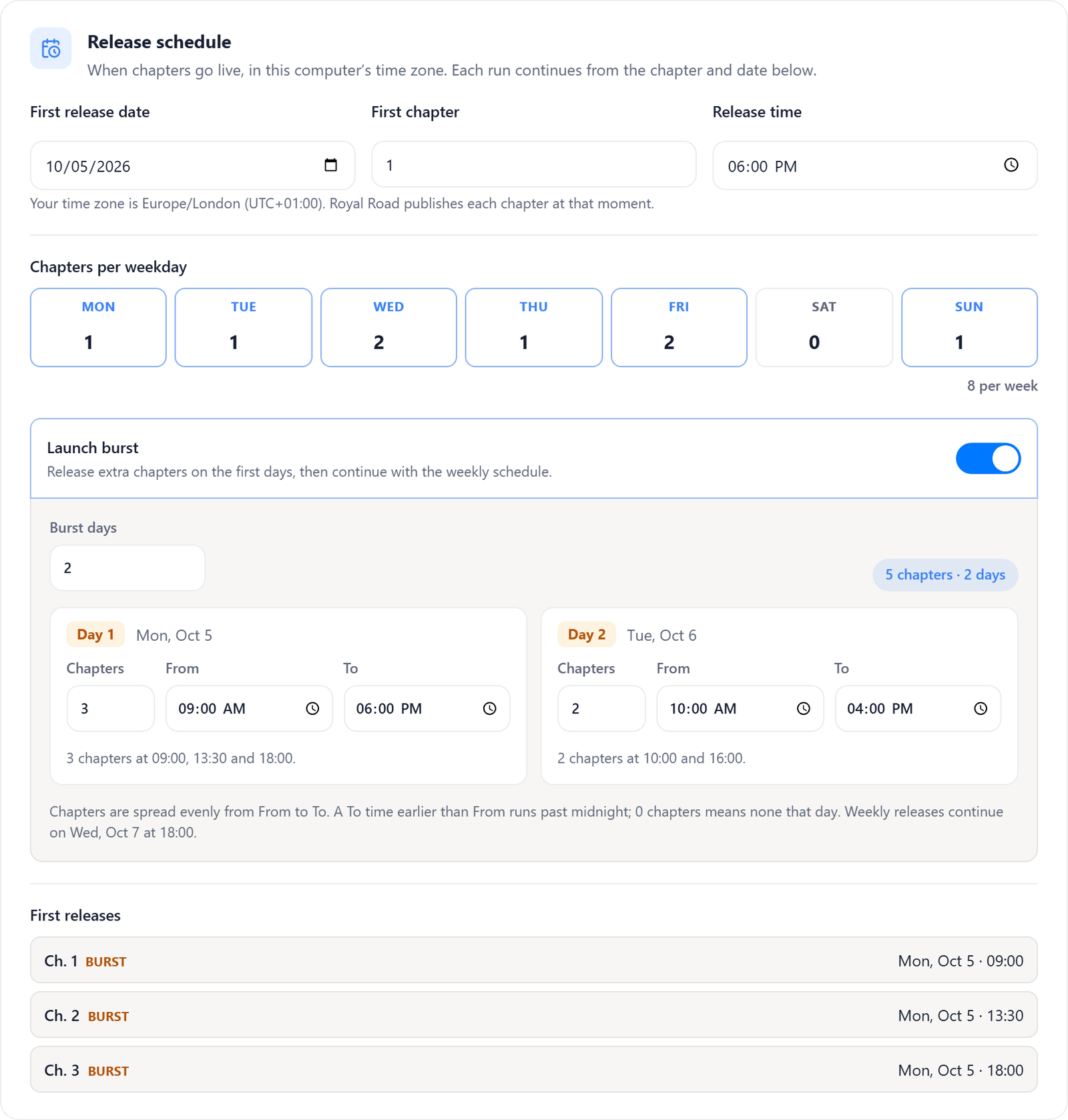
Set the chapter count for each weekday. Use zero on days you do not publish.
Import your chapters, set a weekly schedule, and mass schedule them from your Royal Road author dashboard. Built for Royal Road authors who want their release day back.
 Chrome extensionRoyal Road
No login needed. The extension works right on your Royal Road author dashboard in your own browser, just as you would by hand. You never give us your Royal Road login or password.
How it works
Paste from Word or Google Docs, or upload your files. Each chapter keeps its own title.
Paste or uploadChoose the first date and how many chapters go live on each weekday.
A count per weekdayCheck every chapter, date and time before anything is scheduled.
Nothing sent yetPress Schedule once. Every chapter is scheduled on Royal Road for you.
One runYour week
Choose how many chapters go live on each weekday. Use zero on days you do not publish.
A sample schedule
7 chapters this week
22 chapters in launch week18 of them in the first 3 days, then the weekly schedule takes overBurst dayWeekly schedule
Private by design
Everything happens locally in your browser. There is nothing to hand over: no password, no uploads to our servers, no diagnostics.
The extension works right on the Royal Road page you already use, just as you would by hand. There is nothing to connect and no Royal Road password to give us.
Your chapters and project settings are saved in Chrome on this computer, and go straight from your browser to Royal Road.
Our servers never receive your chapter text, notes or logins. No diagnostics, crash reports or analytics are collected.
Polar handles checkout and invoices. We never see your card details.
Video guides
Short walkthroughs of importing chapters, setting a schedule and checking results.
The extension
Prepare multiple chapters in one place. Check chapter numbers, choose when they go live, and review scheduling results.

Step 1 of 4
Paste from Word or Google Docs, or upload .docx, .txt, .md and .html files. Each chapter keeps its own title, bold and italics.

Step 2 of 4
Choose the first date, the chapter to start with and how many chapters go live on each weekday.

Step 3 of 4
Open the scheduler on your fiction in the Royal Road author dashboard and check every chapter, date and time.

Step 4 of 4
See each chapter with its release time as it is scheduled. Retry only what did not go through.
Made for a real publishing routine
Keep settings with each project and move between fictions without rebuilding your schedule.
Cadence
Set the chapter count for each weekday. Use zero on days you do not publish.
Launch
Release more chapters on the first days of a fiction, each day with its own count and time window.
Results
Every chapter is listed as scheduled or failed, so you always know where a run stands.
Notices
Add a Patreon progress notice worked out for every release date, and author notes before or after each chapter.
Recovery
A chapter that is already scheduled on Royal Road with the same title and release time is left alone, so running the same chapters again is safe.
Portability
Export every project, notice and imported chapter to one file, and restore it on another computer.
Patreon notices
Every chapter can end with a notice showing which chapter each of your stories has reached on Patreon. Enter each story’s Patreon chapter on a start date and how many chapters you post there each weekday. The extension works out the right number for the day each Royal Road chapter goes live, even weeks ahead.
Royal Road rejects donation links in fanfiction chapters, so the notice gives your Patreon creator name instead of a link. The extension does not read or publish Patreon posts.
Patreon notice setup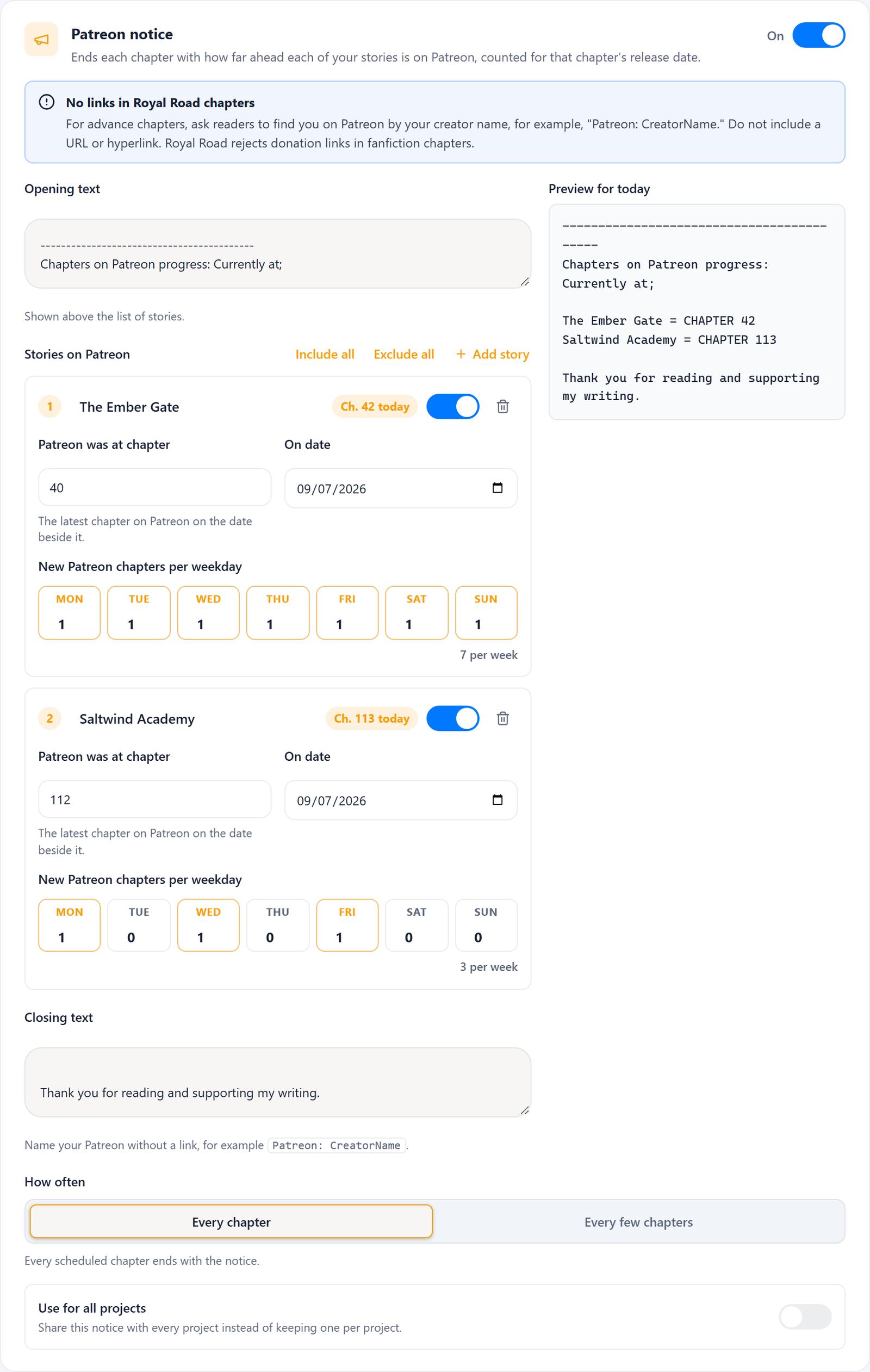
Plans
The free trial needs no card and lets you schedule up to 20 chapters per run, 60 chapters in total (for example 3 runs of 20). Paid plans schedule up to 500 chapters per run, with unlimited runs.
$10 / month Original price: $30
Save $20 every month
No free trial: full access starts as soon as the first payment goes through.
 Webnovel Mass SchedulerUp to 500 chapters per run, unlimited runs

 Patreon Mass SchedulerUp to 500 chapters per run, unlimited runsRoyal Road Mass SchedulerUp to 500 chapters per run, unlimited runs
14-day money-back guarantee
$5 / month Original price: $10
Save $5 every month
Free trial · no card needed
Trial: 20 chapters per run, 60 in total
Royal Road Mass SchedulerUp to 500 chapters per run, unlimited runs14-day money-back guarantee
Prices, billing interval and taxes are confirmed by Polar at checkout. You can cancel anytime from Manage billing; access continues until the end of the period you paid for.
User guide
Installation, sign-in, chapter imports, scheduling, Patreon notices and troubleshooting, step by step.
Questions
What authors usually ask before their first run.
The Support page covers setup and common problems, or write to us directly.
No. Everything runs inside Chrome on your computer. The extension schedules in the Royal Road tab you are already signed in to, so you never give us your Royal Road password, and your chapters go straight from your browser to Royal Road. The extension collects no diagnostics, crash reports or analytics.
The free trial needs no card and lets you schedule up to 20 chapters per run, 60 chapters in total (for example 3 runs of 20). Paid plans schedule up to 500 chapters per run, with unlimited runs. Chapters you schedule stay scheduled on Royal Road after the trial.
No. The free trial needs no card: start it on the website with your email address. A card is asked for only when you subscribe to keep scheduling.
Yes. Cancel from Manage billing on your account page. You keep access until the end of the period you already paid for.
No. You review every chapter, date and time first. Chapters are added to your own Royal Road account as scheduled chapters only when you press Schedule.
No. The extension works inside your signed-in Royal Road tab and never asks for your Royal Road password.
No, and the scheduler stops you if you try: Royal Road rejects donation links in fanfiction chapters. Write your Patreon creator name instead, for example "Patreon: YourCreatorName".
Yes. Bundles combine several schedulers in one subscription. See Plans & Pricing for what each bundle includes.
For Royal Road authors
Spend release day writing, not adding chapters one at a time.