Who it is for
Fanfiction authors, web novel and light novel translators, and writers of original fiction who want clean English chapters, chapter after chapter.
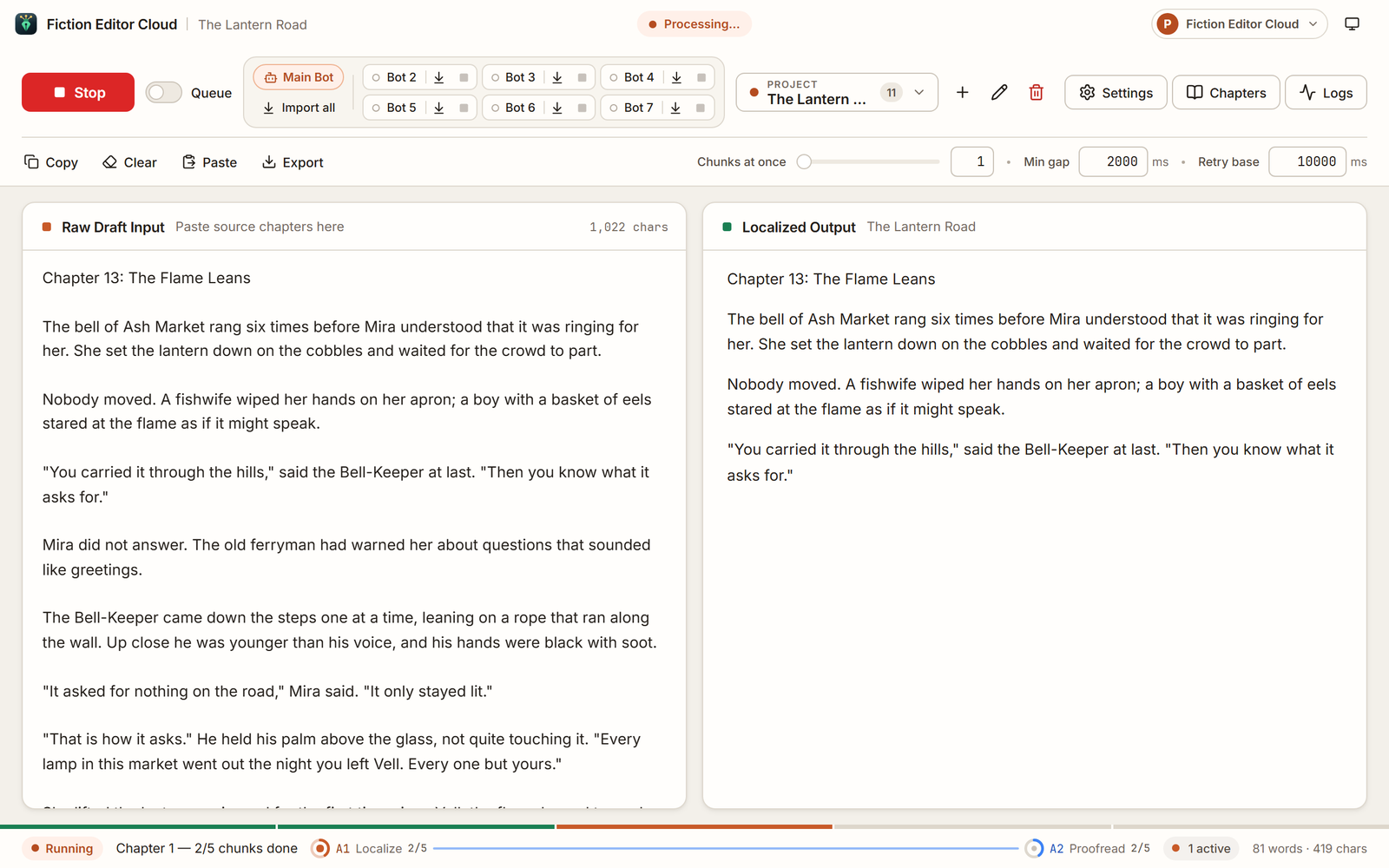
Seven bots edit fanfiction, web novels and machine-translated chapters into natural, fluent English, and keep your story, style and voice. In your browser, from any computer, and the bots keep working when you close the tab.
 In your browserAI editor for fiction
Works with your favourite AI providers
 NanoGPT
 OpenRouter
 OpenAI
 DeepSeek
 Z.AI
 GLM
 MiniMax
 Mistral
 Xiaomi MiMo
 BytePlus
 Ollama Cloud
 Fireworks AI
Made for fiction
An editor made for stories. It polishes the English and leaves the storytelling to you.
Fanfiction authors, web novel and light novel translators, and writers of original fiction who want clean English chapters, chapter after chapter.
Turns raw drafts and machine translations into natural, fluent English: clean grammar, spelling and punctuation, and no leftover translation quirks.
Your story stays yours. The plot, tone, pacing and each character's voice are kept, and nothing is restyled to the AI's taste. Scenes are never cut or summarised.
How it works
Open the editor on this website and sign in with your account. Nothing to install.
Any computerPaste the key of the AI service you use, once. It is encrypted and used only for your runs.
Your own keyPaste one chapter or a whole arc and switch on the editing passes you want.
Up to seven passesThe bots work on our server, sharing one queue. Come back from any computer to read the chapters.
Up to seven botsThe pipeline
Every chapter flows through the passes you switch on, and each one keeps your story's meaning, tone and character voice. These are the passes' default instructions: you can read and change them in Settings. Hover or tap a stage.
Rewrites a raw draft or machine translation into natural, fluent US English, keeping the plot, tone, pacing and every character's voice, with each paragraph in place. Notes, links and promotions that are not part of the story are taken out.
A second pass that fixes the grammar, spelling, punctuation and stiff wording still left, and keeps every name exactly as you wrote it.
Smooths sentences that still read stiff or too literal so they sound natural. No added flourish and no new voice: a sentence that already reads well is left alone.
Corrects quotation marks and dialogue punctuation, and nothing else.
A light polish for clarity and natural dialogue, without over-editing.
The last check of each part before it is saved: small corrections only, nothing restyled.
Reads the whole chapter once and fixes only point-of-view slips, so it stays clear through whose eyes each scene is told.
Real run
The Logs window after a real run of two chapters, a machine-translated web novel chapter and a fanfiction draft, with all seven passes on: every sentence a pass changed, before and after, with its reason.


Made with deepseek/deepseek-v4-pro-0813:thinking through NanoGPT on 17 October 2026. Results vary with the model you choose and your settings.
Inside the editor

Step 1 of 4
Drop in one chapter or fifty. Chapter headings are found for you, and drafts or translations with one paragraph per line are read correctly.
How to paste
Step 2 of 4
Turn passes on or off and give each its own provider, model and thinking setting.
How to pipelineStep 3 of 4
Chunks run in parallel and return in order, and the length lock refuses replies that come back cut short. Close the tab, and our server carries on with the run.
How to run
Step 4 of 4
Every finished chapter is saved in the project, ready to read, edit, copy or export as a text file.
How to exportFree trial
The free trial lasts 1 day and needs no card: 1 project and 20 chapters, run with your own AI key. Subscribe to keep using the app when it ends. One free trial per person.
How the free trial works
Built for serial writers
Start the main bot and six more on one queue, close the tab and shut the laptop. The bots work on our server; open the editor from any computer to see where they are.
Every reply is compared with your text. If the AI cuts a scene, summarises or pads, or merges, drops or moves paragraphs, the reply is refused and asked again. Nothing is quietly lost.
Your AI keys are used only for your own runs. No other account can reach your space.
The same file as the Windows app's, without your keys: move projects between the two whenever you like. They never sync by themselves.
Backups and the backup fileDownload everything as one file, or delete it from our server, whenever you like.
See each request and each edit a pass made, with search and filters.
Plans
One subscription opens the editor in your browser. You pay your AI provider directly for what you use. Every payment comes with a 14-day money-back guarantee. The Windows app is a separate subscription.
$10 / month Original price: $15
Save $5 every month
Free trial · no card needed
1 day free, no card · 1 project · 20 chapters
Fiction Editor CloudIn the browser14-day money-back guarantee
Prices, billing interval and taxes are confirmed by Polar at checkout. You can cancel anytime from Manage billing; access continues until the end of the period you paid for.
Windows or browser
Both have the same seven passes and the same length lock. Pick the one that fits how you work.
Each is its own subscription, and one does not open the other. Every payment comes with a 14-day money-back guarantee: Refund Policy.
Questions
What authors usually ask before their first run.
The Support page covers setup and common problems, or write to us directly.
Your projects, chapters, settings, prompts and AI keys, in a space of your own that no other account can reach. Your text goes only to the AI service you chose, for your runs.
You use your own API key at a provider such as NanoGPT, OpenRouter, OpenAI or DeepSeek, and the provider bills you directly. The free trial lasts 1 day and needs no card: 1 project and 20 chapters, run with your own AI key. Subscribe to keep using the app when it ends.
The same editor with the same seven passes, in your browser. They are separate subscriptions and never sync: the Windows app keeps everything on your PC, the cloud keeps it on our server. A backup file moves your projects between the two, both ways.
A run going on stops, and finished chapters are kept. Your projects are kept for 3 months, and we email you a reminder each month: in that time you can download or delete them from your account on this website, or renew, and Start goes on where it stopped. After 3 months without a subscription they are deleted.
Yes. The account menu in the editor downloads all your data as one file, or deletes it from our server. Deleting your website account deletes your cloud data too.
Yes. Cancel from Manage billing on your account page. You keep access until the end of the period you paid for.
Start the bots, close the tab, read clean prose in the morning.